Xman Blog Inside

Sunday, August 20, 2006

Distributed Parallel Reversi in Java: You have Dual-Core? Quad-Core Processors?

Let's catch up with the technology trends on multi-core processors. If you have bought a dual-core, or quad-core, or a large shared memory parallel machine, or a cluster of computers, then you can run this Distributed Parallel Reversi, xversi-java-parallel-v0.8b.tgz, to make them busy.
Running Distributed Parallel Reversi: Step-by-step
  1. Launch a server in each of your machines that will provide reversi evaluation services.
    • xman@sai xversi-java-parallel-v0.8b # java -Djava.security.policy=xversi.policy XversiEval localhost 9394
      Registered XversiInterface
    • localhost: Machine name, or its IP.
    • 9394: Port number for the client to connect to. Remember to set your firewall to allow this port.
  2. Setup a machine info file called nodeinfo.txt.
    • xman@sai parallel # cat nodeinfo.txt
      2
      localhost:9394
      localhost:9394
    • 2: There are 2 entries about machine information.
    • localhost: Machine name or its IP. I include two identical lines because I'm running this on a dual-processor or dual-core processor machine. This will make the parallel reversi to utilize the two processors in the system.
  3. Launch the Java Applet.
    • xman@sai parallel # appletviewer -J-Djava.security.policy=xversi.policy test.html
      Number of Node : 2
      before lookup
      Node 0 localhost:9394
      name 0 //localhost:9394/xversiInterface
      Node 1 localhost:9394
      name 0 //localhost:9394/xversiInterface
      after lookup
    • I've forgotten how do you specify the policy to a browser to launch the Java applet. TELL ME IF YOU KNOW! ;)
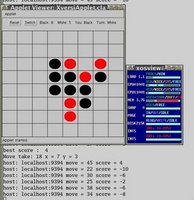
Notice that in picture below, two processors in the system are running at full speed to evaluate different moves at the same time. :) Hence, if you bought a dual-core, quad-core, ... or even a cluster of computers, enjoy the benefit of parallel computing. :) Ideally it will run N times faster with N processors.

Click to see larger picture

Labels: , , , , , , , ,

Latest Reversi in Java: After much "backup recovery"

The latest Reversi in Java had been kept safely in my backups for quite some time. I recall that I did backup it into CDs, together with many versions of reversi I developed. After backup into CDs, all the files become capital letters, hence, I have to change all the files into correct case before I can launch the Java applet (Stupid backup). That took me quite some time, together with cleaning up many different versions. It was a mistake I didnt use any version control software such as CVS, SVN, ... during development. From now onwards, all changes shall check-in into my svn repository.
Here is the latest Reversi in Java, xversi-java-v0.7a.tgz under GPL, which added some little features on top of xversi-java-v0.6b:
  1. Show a green dot of computer's last move.
  2. Compute end game when the game is near end.
  3. Draws the piece with better aspect ratio as we resize the board.
Lessons learned:
  • Always document your changes to your documents, codes, ... Use tools such as CVS, SVN, ... to help tracking the changes.
  • I shall prepare a changelog file in the future releases.
  • Backup each version of your programs into a package such as .tgz, or .zip, such that when you recover from your backup, program files attributes, from filenames to their permissions, are recovered to the original. Versioning helps you to clean up the mess.
  • Portable is good. :) After few years, these reversi programs are still running properly without much issues. :)

Labels: , , , ,

Tuesday, August 15, 2006

My first open source programs

Have been writing many toy programs which end up in the recycle bin, and then flush to no place. I hope from now onwards, my programs can have longer livespan. Let me start with some bash scripts, xman utility under GPL:
  • xman_rm: Move given files into the folder ".deleted". So that I can recover the files in the future if we need to.
  • xman_list_rb: List files deleted using xman_rm.
  • xman_clean_rb: Delete all files found by xman_list_rb permanently.
  • xman_create_pdfdb: Process given folder recursively for .pdf files. Convert all .pdf files into .txt and store in database folder.
  • xman_lowercase: Convert all given file names to lowercase.
  • xman_uppercase: Convert all given file names to uppercase.
  • xman_chext: Convert file extension to another extension.
  • xman_tolower_filter: Convert strings from stdin to lowercase.
  • xman_toupper_filter: Convert strings from stdin to uppercase.
Hope these scripts may help you for your work. If not, you may still learn some bash scripts from these. :) You may also suggest useful scripts for routine work.

Labels: , , ,